


Mouse Clicks Visible Effect |
||||||||||||||
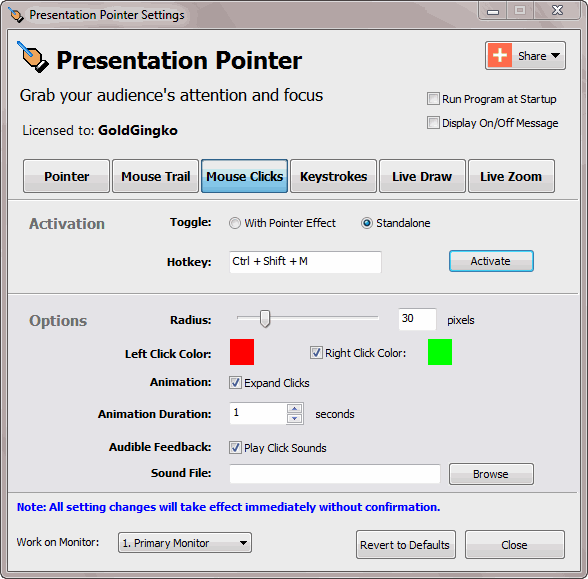
Presentation Pointer added more visual and audible mouse click effects including different colors for different buttons. The audience not only sees the mouse clicks but also hears them. A visual and audible effect can give feedback when you pressed a mouse key. Mouse Clicks, as shown below, display a circle if you click one mouse button. Adjust all settings related to mouse clicks on this page.
Activation The Mouse Clicks effect can be operated in two different modes: Standalone or together with the Pointer effect. The first mode means, you can make the Mouse Click effect independently controllably. The latter mode means the Mouse Click effects will automatically be toggled whenever the Pointer effect is toggled. Options
|
||||||||||||||
Presentation Pointer Step by Step Tutorials
| Title | Category | Format |
| 01: Getting Started | Getting Started Series | Written |
| 02: Highlight mouse pointer cursor during presentations | Presenting Series | Written |
| 03: Mouse Clicks Visible Effect | Presenting Series | Written |
| 04: Display Keystrokes to Make It More Understandable for Tutorials | Presenting Series | Written |
| 05: Using the on-screen pen to draw on video & live screen | Presenting Series | Written |
| 06: Live zoom in computer screen on Windows | Presenting Series | Written |
| 07: Demo of Presentation Pointer | Presenting Series | Video |
| Presentation Pointer Documentation | Reference |


Only $29.95
Money Back Guarantee
Presentation Pointer lets you:
- Grab your audience's attention and focus!
- Highlight mouse pointer that makes it easy for your audience to follow your actions on the screen.
- Add more visual and audible mouse click effects.
- Draw freely on the screen but not lock the screen.
- Display Keystrokes to make it more understandable for your audience.
- And so much more...


